Thursday, November 02, 2006

That's Me, Dressed As A Slutty Blogger

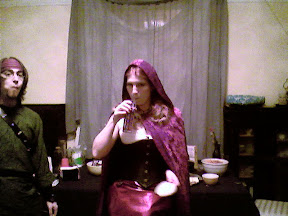
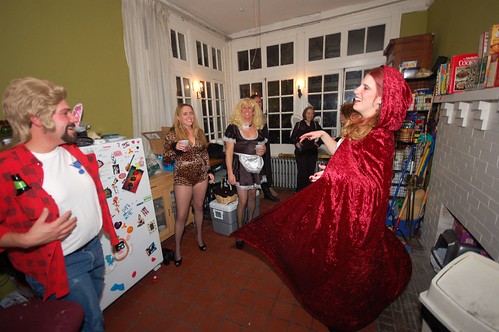
The back-side in the costume is The Brat, almost dressed as Slutty Red Riding Hood. The was of course pre-hood as well as pre-lace-up.

My costume is actually supposed to be Hugh Hefner, although I brought it up as a joke. "I don't want to have to wear anything more complicated than pajamas," I told The Brat. "And Arthur Dent is played out. I think it's gotta be Hef."

It was really just a one-off, an attempt to dodge the question, but once she ordered the silk pajamas and silk robe, what was I supposed to say.

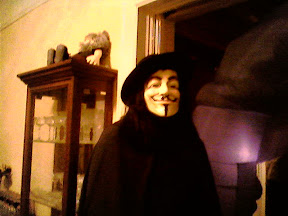
Next year perhaps I'll be James Bond so I can get a nice tux. Or maybe Adam Ant in his Dandy Highwayman or Prince Charming phase. That is, if I don't just go as Alfred Hitchcock, as seen here.


They should have shopped at Girls's Costume Warehouse
The woman in the party store looked skeptically at the picture of the model wearing the witch costume. "Don't you think it's a little... revealing?" she asked. Her larger friend stifled a laugh. "Sure, but you can pull it off." I stifled a laugh as I passed, as well. "I could pull that off," I told them. "We're not at Fredericks', y'know. It's Halloween, ladies; you can't just be a witch, you have to be a slutty witch."

I'ts taken me far too long to put this together. AW (not Adam Weishaupt) got his pics to me a day or so after the party, and I had the album on the web with his kind permission within a few days. I'm not sure if the quality is due to the camera (phone AW?), the lighting or the inebriation of the photographer, but I was just glad to have some shots.


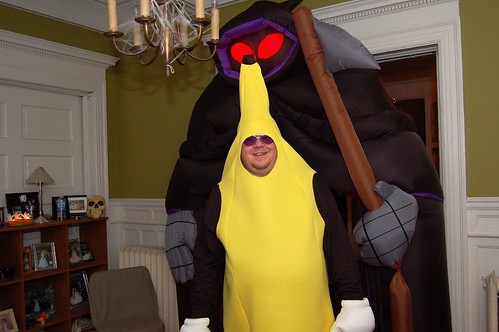
Topher got some really good shots early in the party, but discovered quickly that a drunken banana with Mickey Mouse hands should not be handling expensive photographic equipment. It took him a while to get them up in a Flickr set, but I can't complain because it took me longer to post this.


I wish I had some Amazing Tales Of The Party, but I spent so much time mixing (and tasting) drinks that much of the party is a blur to me, and all the good stories were things that happened outside the kitchen. I'm also not aware of any other photos, so if you have any leave a comment or email me at owenj23 at gmail dot com. I'd love to post or link to them. Thanks to everyone for coming, it was a great time, and we hope to see you again on NYE whenever we next have a party.

Costume Suggestion for BMWFor now I'll leave you with this picture that I found on an MSDN blog to which I've lost the link. This is my suggested costume for BMW next Halloween, if he doesn't want to be The Whiny Baby again.

HOW-TO: Make BlackBerry Internet Service Work With GMail (again)

[Ed. Note - A few people have pointed out that Google just released a Gmail client for mobiles, and BlackBerry is one of the supported devices. I just installed this morning, and yeah, it totally rocks. While it may actually be faster and easier to view and reply to messages via the app, it can't replace the satisfying chirp my BB gives when a message comes in. For that, the instructions below are still useful.] While I'm not sure what the official stance of RIM is, let alone other carriers, it became apparent through multiple rounds of calls with T-Mobile "Customer Care" that they are no longer required to Care when their Customer's Gmail stops being picked up by BlackBerry Internet Service. Phrases like "it might help if" and "it's about 50/50" and "we do not guarantee service" were mixed liberally with "it works on mine" and "I use it all the time." Armed with this knowledge, as well as a fierce determination honed by hours of hold music, hang-ups, and one threatened arrest, I found my own solution. The following procedure has been tested on my device, and on the device of one guy I found on BlackBerry Forums who was having the same problem. I'm planning on posting a link to this in a few places, so if you try it for yourself let me know the results. Step 1 Log in to My T-Mobile (or, well, your T-Mobile to be precise). Click the "Set Up BlackBerry Internet Email" and click it. From there you will be presented with a list of all your email addresses. You'll need to click that little trash-can icon next to each of them, or at least each that is not working. NOTE: You'll lose any filters you have set up, so you may want to make a note of them for later. Step 2 On your BlackBerry, go to Options->Advanced Options->Service Book. (I think the menu location is different for this on older models. Anyone know?) Delete the service books for all email accounts (you'll recognize them by your email address followed by [CMIME]). Yes, even the entries for the ones that are still working. On the Pearl, this is accomplished by highlighting the entry, pushing the menu button, and selecting delete. YMMV. Step 3 Meanwhile, Back On The Web: Log in to your Gmail account and click "Settings" in the upper right corner. Select the "Forwarding And POP" tab. In the "POP Download" section, select the radio button labeled "Disable POP" and then click Save Changes. There, you're done. You've now guaranteed that you will never receive Gmail on your BlackBerry. Oh wait... that's not where we were going, was it. *sigh* Step 4 Now we're on the comeback trail. Go back to your T-Mobile account (I hope you're using Firefox, or at least IE7's tabs) and click the "Service Books" link on the left. Click the little pink button to "Send Service Books" to your phone. This will ensure that any accounts you have no deleted get set up on the BlackBerry correctly, and seems to be an important step in this process. Roger Ebert of The Chicago Sun-Times says, "If you follow only one step this tutorial, Step 4 is the one to follow." Step 5 Back to Gmail again. I hope you're still in Settings->Forwarding and POP, as it is time to turn POP back on. Select the radio button that says "Enable POP only for mail that arrives from now on" and click Save Changes. It seems to be important that you select this option, rather than "all mail", even if you really really want your old mail on your device. Trust me, it's gone. It's just gone. Answer it from the Gmail app and move on with your life. Step 6 And hopefully the last one. On the T-Mobile site, go back to Email Accounts. Click "Setup Account" and enter your Gmail address (including the '@gmail.com') and password (twice). A quick click on the Next button and you should be done. For all their talk of not supporting Gmail, they obviously know the IP for the POP server (which they claim does not exist). You should get an activation message on your BlackBerry within a few minutes. If you do not, delete and resend your service books once again - for instructions see Step 2 and Step 3 above. That bit seemed necessary for me, but not for the other user who tried it, so again let me know if you follow these steps what happens for you. So there it is. As I said, let me know if you try this, what the results are, and if I missed or mis-stated. If you're having similar problems but do not use T-Mobile, I suspect that similar steps may work for you, but you'll obviously have to figure out your provider's interface yourself. I have no idea yet how often this process might have to be repeated. I've tried everything I could think of to re-break my Gmail POP access and have not yet had any luck, so I still can't guess what caused the problem initially or when it might recur. Any further data on this would be appreciated.

Tuesday, October 31, 2006

Midnight In The Garden Of Pumpkin And Squash

It's still nearly three hours until The Great Pumpkin should be arriving, but as always it's getting cold, and boring, and a little bit lonely here in the pumpkin patch. I've been having blog troubles recently, not so much with writing as with not writing. Well, and finishing... that's kind of a bitch too. I wish there was some way I could publish a post in beta. Of course, with no readers it doesn't much matter what I post, let alone whether I post. On the other hand, I kind of expect that sooner or later, I'll pick up a few regulars. I can't possibly be the only person who uses Google Reader to stalk my friends and idols... and if I am the only one, I'm about half-way through writing a primer on setting it up for yourself. I can't be expected to finish any of these things until at least this weekend, however, as I have to stop writing every 10 to 15 minutes so I can play with my new toy. The Pearl is pretty -- too damned pretty, according to this article by Jack Kapica in The Globe And Mail, which suggests that if I was a Real Man I'd buy a RAZR. And perhaps he's right, because I haven't shaved in days. Not to mention the fact that some very sexy, very rich little girls have been shot while holding lately. However, I think this picture of my k-rad case mod should prove that I'm at least a Real Nerd. It seems that my new toy is so much smaller than the old one that it slides right past the sensor. However, through painstaking moments of looking around on my desk, I discovered that the cap from a Sanford Uni-Gel Medium (seen here in stylish red Crimson Dash) is the perfect size to trigger the sensor. And they thought they could make me buy a new case? I feel all MacGyver, like I should send this in to the MAKE blog or something. Probably soon, before the Pearl slides out of this oversized case and I never see it again. I had written a review of Performancing v1.3, which is a Firefox extension designed to make blogging easier. Unfortunately, I made the mistake of using the software to review itself and once it became aware that my opinion was somewhat luke-warm it promptly deleted the post. Prior to hating it with a passion, however, I truly didn't think it was all bad. My problems are almost certainly because I'm using Blogger beta, and a dev build of Performancing that was designed to work with the beta but has not been fully tested. I'll probably check it out again once the Blogger changes stabilize.

Monday, October 30, 2006

The Emergency Blogcast System

This is only a test. Just got my new phone, a BlackBerry Pearl, and it's like learning to type all over again. I like the feel of the keys though. Still trying to decide whether I do better with two thumbs or two index fingers. I have at least eliminated the pinky-nose combination. I'm also trying to set up Blogger for posts from my phone. Not yet sure how successful that's likely to be but if you're reading this it must have worked acceptably. [EdNote: Not as well as I'd hoped, but at least the Message-To-Blog system seems to work. More on getting Blogger Mobile set up if and when I am successful.] Tomorrow I'll try to put up a few links to party pics from last night. Tonight I'm busy trying to fold my way through a HORSE tournament on Full Tilt poker. We're about to hit 60/120 7-stud and I have less than 9 BB's so I'll probably be in bed soon.

Sent wirelessly via BlackBerry.

Tuesday, October 24, 2006

LiveBlogging The Firefox 2.0 Release

Word is that Firefox 2.0 is due to be released sometime this afternoon. Who the hell releases their software in the afternoon anyway? Are you going for that crucial after-school download market there or what? Anyway, I'm planning on playing with it as much as possible today, and I'm going to try posting results as I'm able throughout the day. Why? Hmm... nothing better to do?
9:45am
For those of us saddled with day jobs at which we can fake-work by testing new software, it appears that the Firefox team really ought to change how they build URLs if they want to keep their software to themselves through the morning. You can go download it from the ftp site if you're a little clever.
9:51am
My two favorite extensions, the plug-in for del.icio.us and the Tabrowser extension, are not compatible with the new version. Le sigh... I know a lot of Tabbed Browsing was included in the new version, I'll have to find my key functions in the options panel.
10:00am God I love the internets. It seems that David Findlay (whoever that is) has been kind enough to solve my problem for me. I haven't tested it yet, but this blog post gives details on how to get the del.icio.us extension working in Firefox 2.
10:27am It looks like you probably want to read David Findlay's post before you upgrade rather than after. I was unable to get it working post-install, and it looks like I may have to do some real work before I can try again. OTOH, if all it takes is a minor text edit to make it work, maybe the del.icio.us folks will get it working pretty quickly. I'd check their site before I went to too much trouble if I were you.
10:47am I miss my Tabbrowser extension. I have yet to find a way to get the search bar to open searches in a new tab.
10:56am You can configure Firefox 2 to automatically subscribe to feeds using Google Reader. Sweet. Check under Tools->Options->Feeds->Subscribe To Feed Using. Other pre-loaded options include Bloglines and My Yahoo, but I'm sure someone will figure out how to put everyone's personal favorites in there soon. Really, though, I'm pretty sure your personal favorite should be Google.
11:49am History->Recently Closed Tabs. Idiot protection for my occasional bouts of hyper-aggressive resource-releasing.
11:56am Firefox Build Engineer J. Paul Reed on why no one should do what I'm doing. Take it from me, kids, downloading pre-release software is neither safe nor a good idea. But it does beat hell out of real work.
1:13pm Just back from lunch, and David (do I know you, David?) has left a comment saying that the del.icio.us extension mod that I posted before worked for him, both at work and at home. It's possible that I was just impatient, as it apparently does not activate the first time you restart but does by the second restart. Whatever you do, it should be noted that clicking the uninstall button is not a good idea under any circumstances if you want to get it to work later. Trust me.
1:32pm Cool new feature: there's a Restart Firefox button after you install an extension. I used to have an extension installed that did this, but it stopped working due to some versioning problem with the Firefox 1.5.0.x Extension Manager. I may yet add it anyway, if the trickery I'm trying now works out.
1:37pm Been using the new version for hours now, and I just noticed the form spell-checker. Of course, I noticed it because it believes that I misspelled "versioning" above, but I'll give it a pass because it's a neat feature. Apparently I could, if it bugged me enough, right click on this (or any) text box and turn spell-checking off for that control. I wonder if there's a way to add words to the dictionary?
1:40pm Super-cool. The "Restart Firefox" button re-opens any tabs. Didn't check if it will re-open multiple windows as well, but I bet it does. Oh, and my XPI hack seems to have worked to re-install the del.icio.us extension. I'll write it up in a minute, once I've tested a bit more.
2:49pm The Restart Firefox extension I mentioned earlier installs just fine, despite the fact that the minversion and maxversion properties in the install.rdf file are both set to 1.4. It didn't work under 1.5.0.*, and I really don't understand why it would work now. Any help?
2:52 pm It works even better than before, too. Just like the "Restart Firefox" button in the extension manager, it re-opens tabs. Again I'm too lazy to test with multiple windows.
3:32 pm Just posted the instructions for modifying the del.icio.us XPI in a separate entry. Not sure, but it looks like they may have already taken care of this in their posted install. I'm leaving work now, but more later once I start breaking shit at home.
7:24pm Take a few hours off and the whole world changes. The good news is, the release is now official, so you can disregard any earlier whinings warnings you received about pre-release software and download it now. The other good news is that updates came out for del.icio.us, Tabbrowser Preferences and Greasemonkey to keep them compatible with 2.0. I doubt that any of these updates did much more than update the maxversion property as I described, at least they are now official.
7:49pm I guess it kind of looks like I was wasting my time earlier trying to update them myself, but that wasn't really the point. I did learn a lot about how extensions are put together, and I got a comment from someone I don't even know. I did have two extensions installed that have not yet been updated for 2.0. The openselectedlinks extension didn't update, but I just uninstalled since my primary use for it has been supplanted since I found DownThemAll! (which did update). Feedview is a really cool little extension that formats the display of an RSS feed, but I went ahead and uninstalled it so I could see the supposed improvements in FF2's RSS display.
7:59pm Firefox relaunched their Recommended Extensions Add-Ons page along with the new version, and TechCrunch compares the new 20 to the old 11 to find the winners and losers. I've been waiting for 2.0 to come out to publish my own recommended list, so expect to see that as soon as I can remember to start calling them Add-Ons instead of extensions.
9:37pm I just installed a nice little extension called TinyMenu which (with a little bit of work) let me entirely eliminate one of the standard toolbars from my life. I got the details from the LifeHacker Download of the Day article, you probably should too.

HOW-TO: Modify an extension to install under Firefox 2.0

The following steps have been tested on the del.icio.us Firefox extension. I read in this post by David Findlay that the extension seemed to work fine in Firefox 2.0 despite it's maxversion property. I attempted to follow the steps therein, but was too impatient and failed to wait for the second restart before giving up and uninstalling. Due to my massive del.icio.us addiction, however, I had to invest a bit more effort. Creating XPI Installer Modules on the Mozilla Developers Center was extremely helpful, and a little guesswork led to the following procedure. Step 1: Download the XPI file by right-clicking on the link (usually a big button that says something like "Install Now") and selecting "Save Link As..." Step 2: XPI files are (conveniently) nothing more than specifically ordered ZIP files it turns out, so you can open them with just about any compression utility. I use IZArc out of habit and because it's free, but most any would do. You might even be able to do it from Windows without any special software if you want to badly enough. Whatever your preference is, right click on the XPI in explorer and use "Open With..." to view the contents of the file. Step 3: In the root directory will be a file named install.rdf. If your compression utility allows you to edit files in-place within the XPI, open it up from there. Otherwise, extract the file and open it with any text editor. I'm a big fan of EditPad Lite because (again) it's free and knows how to deal with *nix carriage returns, but even notepad.exe will do fine for this. Step 4: Find the line that says something like 1.5.0.* or and change the value to "2.0.*". Step 5: If you had to extract the file to edit it, go back into the archive and delete install.rdf, then add your modified file. If you made your changes in-place, you can just save the file. Step 6: If there is a folder labeled META-INF in the XPI, delete it. This contains the signature information for the extension, but it will no longer match since you made changes. However, it doesn't seem like much of a stretch to trust this particular unsigned XPI, since you just unsigned it. Step 7: Do whatever you need to do to make sure changes to the XPI are saved, then close your compression utility. Step 8: Right click on the XPI file, select "Open With...", then choose Firefox from the list. Click the Install button, Restart Firefox, and you're good to go. Hope this works for everyone, it seems like a fairly easy procedure. Of course, you should keep in mind that some extensions are marked incompatible for a reason. Don't do this at all if you're not comfortable crashing Firefox completely, potentially losing all of your settings, probably suffering premature balness and possibly going to hell.

Sunday, October 22, 2006

The Dresden Dolls
Live 2006-10-21 St. Louis, MO @ The Pageant

I have to admit, I don't like being punctual. I can do it, but it causes unacceptable levels of stress in my life. Honestly, I'd rather just show up fashionably late. When it comes to shows with opening acts, I've seldom regretted this. A local band called Big Fun (probably the same group that did "Suicide - Don't Try It" in the movie Heathers) taught me this almost 20 years ago now, opening up for Men Without Hats at Mississippi Nights. [Date?] Maybe if I'd have even heard of The Red House Painters things would have been different, but "Australian experimental electronic" had entirely to many vowels in it for my taste. If I'd thought things through, however, I'd have known that The Dresden Dolls might very well put together a show worth some punctuality pains. Instead, I realized this as we walked in the door and Amanda Palmer was thanking the pole-dancers and Something Elvis (does anyone remember what she said?) that had just left the stage. We didn't miss much of the main event, at least, as The Dolls were just starting their second song as we took our seats. I can't tell you what they were playing, although I remember it being one of my favorites from the first album. However, I spent those first few songs mesmerized by the girl doing chalk drawings at the farthest point stage right. It wasn't her art, which reminded me entirely too much of the goth-chick drawings from coffee houses past. (I've never been able to appreciate goth-chick art, poetry, music, etc. properly... or at least not properly enough to have closed the deal with many goth-chicks.) It wasn't her dancing, which was a kind of back-turned booty-shake at best. It wasn't even her body, which was nothing to sneeze at unless perhaps she had a cold or something. But the combination of three - the way the drawing took shape as her arm moved with the melody and her hips swayed to the beat - was a pretty impressive performance piece. By the end of the show, she was doing chalk drawings on people's backs, which was substantially less visible but extremely cool nevertheless. The Dresden Dolls were of course amazing as always. This is only the second time I've seen them live, both times at The Pageant, and I was again astounded by the energy that two people on a mostly-empty stage can create. Their shows remind me of the way it felt seeing some classic punk bands waybackwhen, like Black Flag with less anger and more sex. Of course, there's anger as well - with two percussionists on stage, how could there not be - but it's always delivered with a wink and a nod, sometimes literally. I don't know what kind of personal relationship Amanda and Brian have, and perhaps I don't want to. The fantasies speculations inspired by the Backstabber videos are far too much fun to be ruined by mere realities. However, I find it amazing that there can be that much sexual tension between two people on a stage ten yards apart behind musical instruments in front of 1500 people, regardless of the personal dynamics that make it happen. I wish I was the sort of person that could run down the entire set-list from memory, or even find it online, but the best I can do is the few recollections that Topher and I managed to cobble together 24 hours later. I think we may have come in during "Girl Anachronism" - can't be certain, but it was played and I didn't pay much attention, so that makes sense. There was a great version of Missed Me pretty early, which really got the crowd going, and a sing-along "Coin-Operated Boy." Brian repeatedly silenced Amanda during the "I want a..." skip-repeat bit and used his sticks to conduct the audience as a chorus. There's something pretty hot about a few hundred girls singing that over and over again. I had a curious moment of deja vu when they launched into their cover of Black Sabbath's "War Pigs," both because they had played it when I saw them previously and because I had just seen The Flaming Lips cover it the last time I was at The Pageant. I think my preference for slightly skewed covers leans me towards The Lips' version in a fair fight, but The Dresden Dolls are unsurprisingly more faithful to the original and they tore shit up. They closed with several songs from the new album, including (at least) "Dirty Business" and "First Orgasm," and walked off to a (nigh-guaranteed) thunderous standing ovation. They made us pound on things for four or five minutes before they came back for the (contractually-obligated) encore, but they rewarded us with a guy with a guitar and a green gown. I was a little bit worried when he was introduced as a member (leader?) of the opening band - "guy with guitar and green gown in Australian experiemental electronic outfit" is a lot of alliteration for aspiring anchormen perched in precarious positions - but they totally blew away the rest of the show by breaking out Tears For Fears' "Mad World." I remember buying that album not too much after it came out, 1983 or 1984, probably because I heard Les Aaron play "Mad World" on WMRY. Ah, to be young and have no taste again. There was another song after this, then they closed the encore with "Half-Jack." Or so I'm told, the cover of "Mad World" left me feeling an odd combination of drained and filled. I decided that I needed a quick trip to the restroom so I would at least feel merely drained.